How to Claim Your Business on ChatGPT: A Step-by-Step Guide
The way homeowners find and evaluate home improvement companies is changing. While Google remains an important starting point for researching contractors, more consumers are turning to AI-powered tools like ChatGPT to explore local services, compare contractors, and get product recommendations. Instead of scrolling through Google search results, a homeowner can ask AI which roofing companies serve their area or what to consider before hiring a bathroom remodeling contractor and receive a conversational response. For home improvement businesses, this creates another opportunity to connect with potential customers.
OpenAI is now giving eligible businesses more control over that experience through Business Hub in ChatGPT, a new beta offering introduced in November 2026. This Business Hub lets business owners and authorized representatives claim their profiles, manage important company information, and access insights into how people discover their business(es). Claiming your business won't guarantee a place in ChatGPT recommendations, but it does establish another way to manage your company's digital presence as consumer search behavior evolves.
Here's what home improvement businesses need to know about ChatGPT Business Hub, how to claim a listing, and what this development means for your broader digital marketing strategy.
What’s ChatGPT Business Hub?
Business Hub is OpenAI's dashboard for managing eligible business profiles in ChatGPT. You can use it to:
Claim an existing listing
Verify that you're authorized to manage a business
Review the details available to customers
Once verification is complete, you can also see reporting about your business's presence in ChatGPT. If you already have a Google Business Profile (GBP), this might sound familiar. However, Business Hub is not a replacement for your GBP. ChatGPT may use business information from several online sources, and claiming your listing is not the same as directly controlling every recommendation it makes. Think of Business Hub as another place to keep your company's details accurate and monitor your online visibility.
What You Need Before You Start
Before opening Business Hub, gather the information and documentation you may need to verify your business. OpenAI offers several verification methods, but the options available depend on your company and its listing.
You'll generally want to have the following available:
A ChatGPT account: You'll need an account to access Business Hub and manage your company's profile.
Business contact information: Access to your official business phone number or email address may be necessary for verification.
Website domain access: Some businesses can verify ownership by adding a DNS record through their domain provider.
Business documentation: You may need registration information or other documentation demonstrating that you're authorized to represent the company.
Government-issued identification: You must complete separate identity verification through Persona before you can publish profile updates or access business insights.
If you operate multiple locations or work with an outside marketing agency, coordinate these details before starting. Having the right people available to assist with website access, domain verification, and business documentation can make the process easier.
How to Claim Your Business on ChatGPT
Claiming your business on ChatGPT involves four main steps: identify the correct listing, verify your authority to manage it, complete an additional identity check, and review your information.
Step 1: Find Your Business in Business Hub
Verification options and screens may vary, so follow the instructions in Business Hub for your listing.
Start by visiting https://chatgpt.com/business-hub and sign in with your ChatGPT account.
Search for your business by name, then select the correct listing and follow the prompt to begin claiming it. Check the name and location before continuing, especially if your company has several branches or similar listings.
What if your business doesn't appear? Look for an option to add your business to ChatGPT as a new listing, but keep in mind that eligibility is limited. At launch, local service businesses may be able to claim an existing U.S. listing without being able to create a new one. If a listing displays “Contact support,” follow that option. If someone else already claimed your company, use the ownership dispute process instead of making a duplicate.
Step 2: Verify Business Ownership
Next, you'll need to prove that you're authorized to manage your business. OpenAI provides several verification methods.
Depending on your business, verification may include:
Business phone: Request a code by text or automated call, then enter it in Business Hub.
Business email: Receive a verification code at the listed business email address.
Website domain: Add the DNS record provided by Business Hub through your domain provider, then select “Verify domain.”
Shopify: Connect an eligible store if this option appears.
For home improvement companies, phone verification can be slightly more complicated if the number on the listing is a call-tracking line. Some tracking numbers forward calls but don't support text messages, which could complicate verification. If that happens, check whether an alternative method for text confirmation is available.
Domain verification may also require assistance from your web developer or marketing team. Adding a DNS record requires access to your domain's settings, so make sure that someone with the appropriate permissions is available to help.
After submitting your verification request, monitor the email associated with your account for updates. OpenAI reviews business ownership claims and may request additional documentation before approving access.
Step 3: Complete Identity Verification
Once your ownership claim has been approved, there's one more verification step. OpenAI uses Persona to confirm the identity of the person managing your business. Follow the “Verify your identity” prompt and upload the documentation requested. Depending on your business and the information requested, you may need to provide:
A government-issued ID
Business registration information
Documentation demonstrating your authority to represent the company
OpenAI will review your submission and email you its decision or request additional information. Keep in mind that submitting your documentation doesn't mean verification is automatically approved. After your Persona verification is approved, your business profile will receive a verified badge, and you'll gain access to additional Business Hub features.
Step 4: Review Your Business Information
Once verification is complete, take time to review the information associated with your company. Start with your business name, website, contact information, business category, hours, and location details, where supported. Pay close attention to your description; accuracy and clarity are the priorities.
Your business description should explain what your company offers rather than relying on broad marketing language that could apply to any contractor. Instead of vague statements like “We offer quality home improvements,” list your main services and core service areas. For example, a bathroom contractor might describe their shower replacements, bathtub installations, and tub-to-shower conversions within the priority locations they serve.
This is also a good opportunity to review how your company is represented across other digital platforms. Compare your ChatGPT profile with your website and GBP to identify outdated contact information, inconsistent business names, or differences in the services you advertise. For home service and home improvement businesses, these details matter! A homeowner researching a contractor needs to understand which services are available, whether the company works in their area, and how to get in touch. Conflicting information across platforms can create unnecessary friction during that process. If your marketing team or agency helps manage business listings, use Business Hub's access controls to invite authorized representatives.
What Can You See in ChatGPT Business Hub?
Beyond simple profile management, ChatGPT Business Hub gives home improvement companies access to built-in reporting that reveals how homeowners discover and engage with their brand through AI. At the center of this feature is an insights dashboard, which tracks aggregated activity over a rolling 28-day window.
To help you gauge your visibility at a glance, the dashboard breaks your performance down into different metrics such as:
Business Mentions: How frequently your company appears in ChatGPT responses.
Website Clicks: Tracks how often homeowners follow links from ChatGPT to your site.
Discovery Topics: Highlights the recurring themes and services that appear across ChatGPT answers whenever your company is mentioned or cited.
Together, these metrics give you deeper insight into how your brand appears in AI search and what brings homeowners to your site.
Will Claiming Your Business Help You Rank Higher in ChatGPT?
Claiming your business on ChatGPT doesn't guarantee better placement in recommendations or more frequent mentions. OpenAI draws on information from multiple sources when generating responses, and a verified Business Hub profile is just one part of your company's broader digital presence.
So, how do you get your business recommended by ChatGPT and other AI assistants? Start with the digital marketing fundamentals that help homeowners and search engines understand your business:
Helpful website content
Accurate local listings
Credible customer reviews
Relevant service pages
Technical SEO
These practices aren't a guaranteed formula for appearing in AI-generated recommendations. However, they help establish a credible, consistent online presence that supports visibility across multiple discovery channels.
This is where a comprehensive digital marketing strategy becomes important. At Truvolv, we look beyond individual rankings or platforms to understand how a business's website, content, local SEO, and online reputation work together. As search behavior changes, maintaining that foundation helps home service and home improvement companies adapt to new opportunities for customer discovery without losing sight of what drives meaningful results.
Traditional SEO and AI search aren't competing strategies! They're increasingly connected parts of the same customer discovery process. For a closer look at why established SEO practices still matter as AI search evolves, read Why SEO Still Matters in the Age of AI.
Frequently Asked Questions About ChatGPT Business Profiles
Is It Free to Claim My Business on ChatGPT?
Eligible businesses can claim their profiles through Business Hub without purchasing a ChatGPT Enterprise subscription or opening an advertising account. Claiming your business, managing your profile, and accessing available insights are separate from optional advertising and Business Agent features.
How Long Does ChatGPT Verification Take?
OpenAI reviews business ownership claims and identity verification submissions separately. The timeline can vary depending on the information provided and whether additional documentation is required. Monitor your email for approval notifications or requests for additional information.
Can I Claim Multiple Business Locations?
If your company operates multiple locations, search for each business listing individually in Business Hub. Availability and verification requirements may vary depending on the location and business type. Make sure you're claiming the correct listing for each eligible location.
What If Someone Else Already Claimed My Business?
Use the ownership dispute option shown on the listing, or follow the available support instructions. You may need documentation showing that you're authorized to manage the company.
How Do I Add My Business to ChatGPT?
Start by opening Business Hub and searching for your business name. If an existing profile appears, follow the prompts to claim it. At launch, local businesses can generally only claim an existing U.S. listing, so if yours doesn't appear yet, check back as OpenAI expands eligibility.
Why Isn't My Business Showing Up in ChatGPT?
ChatGPT generates responses based on the questions people ask and information available from multiple sources. Your business may not appear in every relevant conversation, and claiming a profile doesn't guarantee that ChatGPT will recommend your company. If you're wondering how to show up in ChatGPT results, start by evaluating your overall digital presence. Make sure your website clearly describes your services and service areas, keep your business listings accurate, publish useful educational content, and build a credible online reputation. Claiming your Business Hub profile gives you another opportunity to provide accurate information directly to OpenAI.
Can My Marketing Agency Help Manage My Profile?
Yes, Business Hub allows verified businesses to invite appropriate teammates and agency representatives to help manage their business information and other available features. Your company should retain control of the primary business account.
Get Help Improving Your Business's Visibility in AI Search
The introduction of Business Hub further signals that the digital discovery landscape is evolving. As homeowners become more comfortable using AI to research contractors, compare services, and explore project options, home service and home improvement businesses have another channel to consider when developing their marketing strategies.
That said, visibility doesn't happen through a single listing or platform. Your website, local search presence, technical performance, customer reviews, and educational content all contribute to how homeowners discover and evaluate your company. These elements need to work together to support a consistent, credible digital presence.
At Truvolv, we help home improvement and home service businesses develop digital marketing strategies built around how customers actually search, research, and make purchasing decisions. From technical SEO and website optimization to content marketing and paid media, our team understands how to connect these channels and turn online visibility into meaningful business opportunities. Whether you're evaluating ChatGPT, strengthening your local search presence, or looking for ways to improve your company's visibility across emerging AI platforms, we're here to help you navigate what's next.
Ready to strengthen your digital presence? Explore Truvolv's digital marketing solutions and learn how our team can help your business stay competitive as search continues to evolve.
Recent Posts
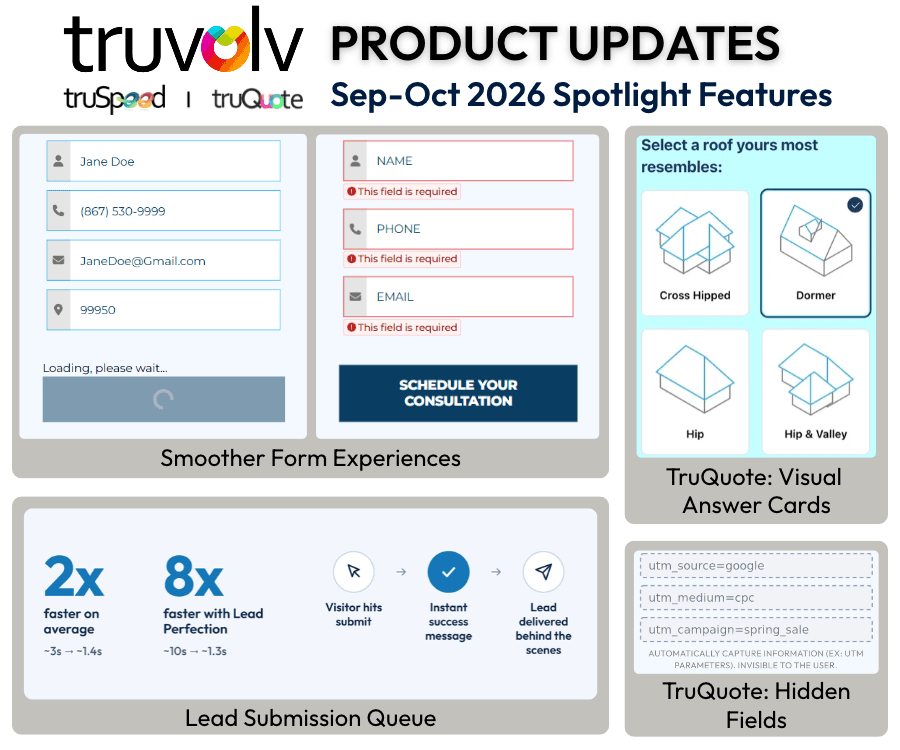
Lead Submission Queue
Smoother Form Experiences
TruQuote: Visual Answer Cards & Hidden Fields
Custom Schema Support
Automatically Generate Image Alt Text
New Modern Footer Layout
Automatic Landing Page Generation
Automatic Lead Form Creation
The way homeowners find and evaluate home improvement companies is changing. While Google remains an important starting point for researching contractors, more consumers are turning to AI-powered tools like ChatGPT to explore local services, compare contractors, and get product recommendations. Instead of scrolling through Google search results, a homeowner can ask AI which roofing companies serve their area or what to consider before hiring a bathroom remodeling contractor and receive a conversational response. For home improvement businesses, this creates another opportunity to connect with potential customers.