

See What’s New on TruSpeed in October
Spotlight Features
The big, shiny things bringing more power, polish & flexibility across our products.
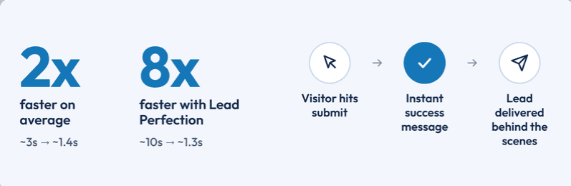
Lead Submission Queue
- What's New: Form submissions now pass through a behind-the-scenes queue. Visitors see a success message the moment they submit, while delivery to TruSpeed & the CRM happens in the background. If TruSpeed is ever temporarily unavailable, the queue automatically retries, & our team is alerted if a lead still doesn't go through.
- Impact for Members: Forms now submit about twice as fast on average, & nearly 8x faster on sites that use Lead Perfection, with no delay reaching the CRM. Visitors no longer wait on slow CRMs, which means fewer duplicate leads, more accurate conversion tracking, & a built-in safety net for every lead.
Smoother Form Experiences
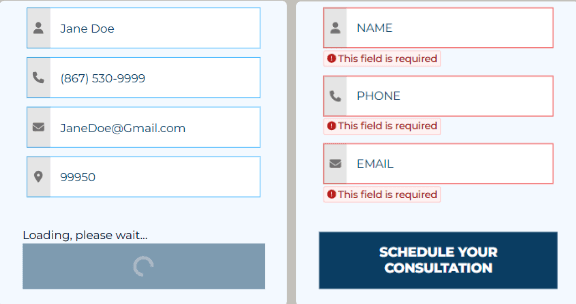
What's New: Forms now give visitors clearer feedback from first field to final click:
- Inline Errors: Errors now appear directly under each field instead of in floating tooltips, & clear as soon as the field is fixed.
- Numbers-Only Fields: Number fields now only accept 0-9, so letters & symbols can't slip through.
- Clear Submit Feedback: Loading starts the moment a visitor hits submit (even during checks like a ZIP lookup), & the button shows a spinner & locks to prevent double-submits. Loading & error messages now sit right above the button instead of at the top of the form.
- Impact for Members: Forms are where visitors become leads, so every moment of confusion is a chance to give up. Clear feedback shows visitors what to fix & that their submission is going through, which means fewer abandoned forms & cleaner lead data.
TruQuote: Visual Answer Cards & Hidden Fields
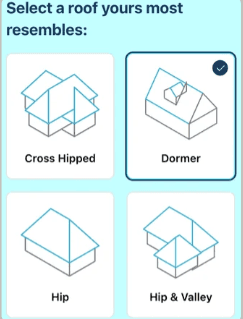
- What's New: Two upgrades that make calculators easier to use & leads easier to track:
Card Grid Display: Multiple Choice questions can now show every answer's image at once, so homeowners can compare options side by side. Previously, only the selected answer's image was visible.
- See It Live - >HERE
- Hidden Fields: A new Hidden Field type lets TruQuote forms carry static values & TruTrack cookie values (on TruSpeed sites), saved on the submission & sent to the CRM without being shown to homeowners.
- Impact for Members: Homeowners can pick the right answer at a glance, leading to a more accurate price range. Plus, leads that start from a marketing campaign & convert through TruQuote now get credited back to that campaign, with static IDs for CRM routing coming through too.
SEO Updates
Behind-the-scenes upgrades that help member sites send stronger signals to search engines.
- Custom Schema Support: Members can now add any valid JSON-LD schema, sitewide or per page, & optionally override TruSpeed defaults. A new Schema dropdown keeps everything organized. Several members have asked for schemas we didn't support, & now they (or their SEO partners) can add them themselves. Learn more here .
- Accurate Sitemap Dates: Each page's sitemap date now only updates when that page actually changes (instead of every rebuild updating all pages), sending cleaner freshness signals to search engines. Dates can be hidden under Sites - > Settings.
- Schema Location Details: Existing Organization & Local Business schemas now include a City field & properly output Country Code, in line with Google standards.
Quick Wins
Small-but-mighty upgrades that bring extra shine, smoother experiences, and more design flexibility.
Block Design Updates:
Column Cards: Images can keep their original shape, icon colors are customizable, & icons sit closer to the content when no image is present.
Text With Carousel: Now supports up to 2 links (previously none).
Tabbed Gallery: Tab colors can now be customized.
Rounded Corners: Now apply to the Before/After Gallery & Review Listing blocks.
Gallery Carousel: Carousels with only a few images now center them.
- Site & Page Automations Upgrades: The landing page generator now handles more of the build (custom content, reusable blocks, sitewide CTA, company name & page indexing), can start from a clean slate, & gives campaign pages their own header & footer without changing the main site's menus.
- Maps Now Powered by Radar: Contact Map & Map blocks have moved from Google Maps to Radar as sites are rebuilt, bringing a nicer map visual & paving the way for future map customization options. Address autocomplete on forms now uses Radar as well, sending better structured address data that's easier for CRMs to work with.
- Refreshed 404 Page: The 404 page now matches each member's site colors & menu, with buttons to go back or head to the homepage, so a broken link no longer feels like a dead end.
- Review Carousel Arrows: Arrows now display properly on smaller screens & inside Content Blocks, so visitors can always browse reviews.
Form Integration Updates
Less flashy, still important. These behind-the-scenes updates allow us to integrate with new members and improve data attribution.
- Zoho CRM Integration: TruSpeed forms can now send leads directly to Zoho CRM. Select "Zoho CRM " as the CRM in Form Integrations and fill out the required info.
- CRM Field Types: A new Field Types section lets you change the format a field is sent in to match what the CRM expects (for now, converting to an array). This sets us up to support more custom CRM fields going forward.
That's it for this update!