

See What’s New on TruSpeed in July August
Spotlight Features
The big, shiny things bringing more power, polish & flexibility across our products. You might notice a theme: we're putting an increased focus on building tools that speed up site building by cutting time spent on repetitive manual setup.
Automatically Generate Image Alt Text
- What's New: TruSpeed can now generate detailed alt text for an image with a single click, no more guessing or hopping over to an external tool. This is the first version of the feature, so please audit the generated text before publishing.
- Impact for Members: Produces high-quality alt text that helps images get indexed, while also improving accessibility & the overall user experience, without the back-and-forth of writing it by hand for every image.
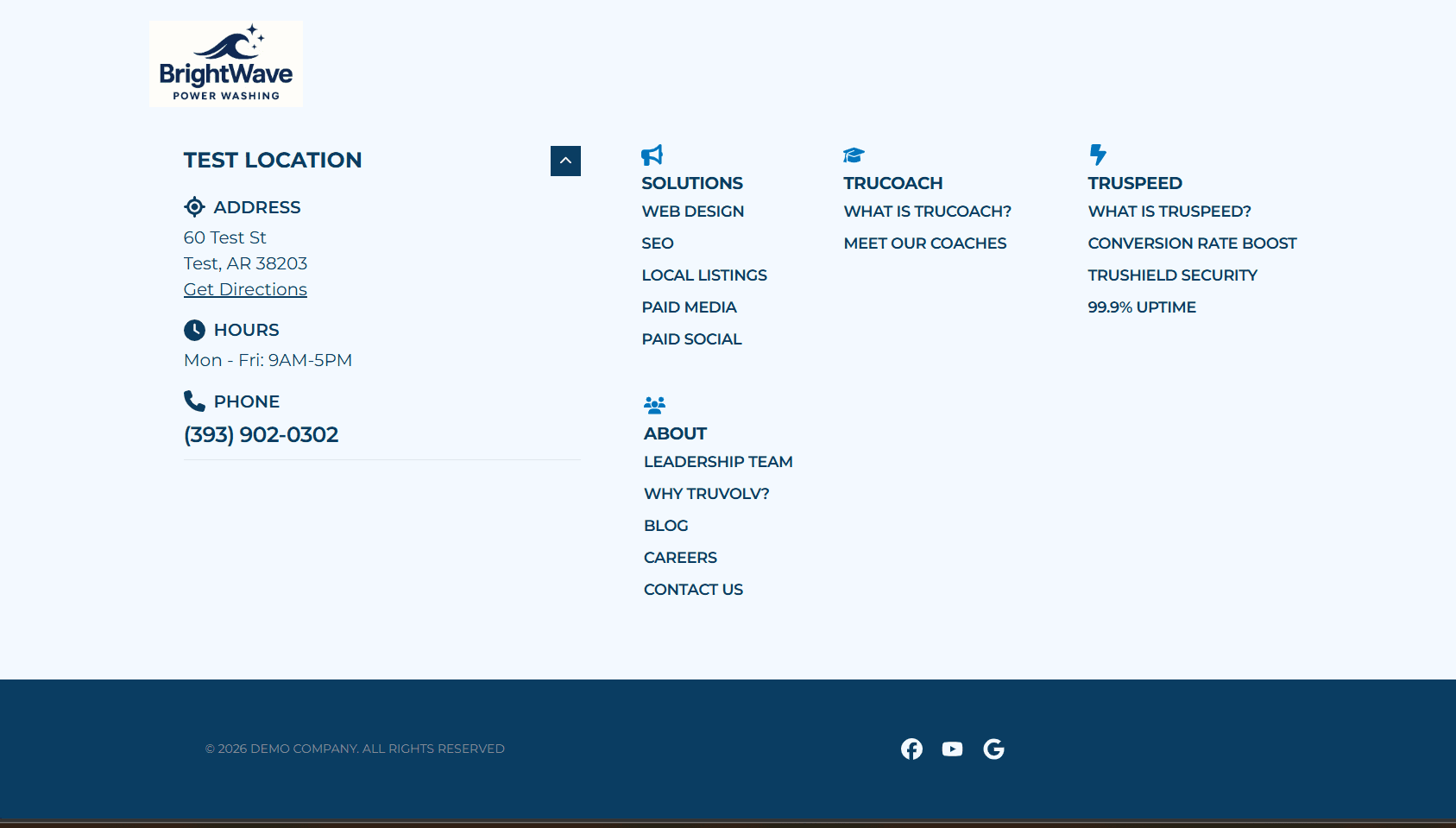
New Modern Footer Layout
- What's New: There's a new Modern Footer layout option that combines the location accordion and menu items into a new footer style, letting you display your business address directly in the footer. Turn it on under Site Settings - > Footer Settings - > Advanced Settings, then choose which locations to display.
- Impact for Members: Gives members a way to surface their business address without relying on a contact map on every page, plus a cleaner, less cluttered footer that still keeps everything accessible.
See it Live - >Here
Automatic Landing Page Generation
- What's New: Generate a landing page skeleton, built to best practices, in just a few clicks. Click "Create a Landing Page, " add your setup details (existing site, existing blocks to reuse, menus, forms & more) or start from scratch, and watch the page come together at the click of a button!
- Impact for Members: This takes a big chunk of manual setup time out of landing page creation, and gives members control over the result too, so a new campaign page can go live with a high-quality page faster.
Automatic Lead Form Creation
- What's New: Select a Hero Form, Sticky Short Form, or Multi-Step form and TruSpeed creates a ready-to-use form with standard fields like first name, last name, phone & email. Plus, no more copying & pasting UTM parameter names, they're included automatically! Use the generated form as-is or customize further.
- Impact for Members: Cuts out the repetitive clicking that comes with building a form from scratch and helps make sure UTM data needed for attribution is captured automatically from the start.
Quick Wins
Small-but-mighty upgrades that bring extra shine, smoother experiences, and more design flexibility.
- Column Card Flexibility: Link labels on Column Cards are now optional (removing these makes the card = the link), and the overlay effect can now show on hover only instead of always on. Hover only applies to images in the image field, not images in the card's rich text area.
- Card Gallery Block Upgrades: A new "Preserve Image Aspect Ratio " checkbox makes the block a better fit for logos & other text-heavy images, and a new "Enable Intro Content " toggle adds a text area for extra intro content beyond the title & subtitle fields.
- More Alignment Control: Medium & High Impact Hero styles now support top, middle & bottom text alignment, giving more control over how content sits against the image. Agreement checkboxes in forms can also be aligned left or center.
- Form Submit Button Loading Spinner: Submit buttons now show a loading spinner while a form is processing, and disable themselves during submission, so users get clear feedback and can't accidentally double-submit.
- Below Block Spacing, Final Rollout: The Spacing Below field is now available on every existing block, including Team Member Listing, Map, Countdown Clock, Video Carousel, Reusable Block, and Events. Any new blocks going forward will include it automatically.
- Image Overlay Strength Adjustment: The Image CTA, Column CTA, and Content blocks now support adjustable overlay strength (Default, 5%, 10%, 25%, or 50%), instead of a single fixed overlay color.
- Tabbed Block Icon Colors: Icons in the Tabbed Block can now have their color and color hue customized.
- Form Integration Rules, Field Name Dropdown: The condition field name in integration rules is now a dynamic dropdown populated from the form's actual field names, instead of a free-text box. Should help cut down on typo-driven attribution issues.
- Form Email Upgrades: A new "Copy Form Fields " button lets you copy every field on a form, plus a default title, straight into your lead email in the right format (no more manually typing each one). Forms also now validate email fields against our provider's requirements as you build them, so any issues get flagged before a submission quietly fails to send.
Lead Form Configuration Improvements
Less flashy, still important. These behind-the-scenes updates make it easier to build & manage lead forms, email notifications, and CRM integrations in the TruSpeed UI.
- Form Integration Rules, Field Name Dropdown: The condition field name in integration rules is now a dynamic dropdown populated from the form's actual field names, instead of a free-text box. Should help cut down on typo-driven attribution issues.
- Form Email Upgrades: A new "Copy Form Fields " button lets you copy every field on a form, plus a default title, straight into your lead email in the right format (no more manually typing each one). Forms also now validate email fields against our provider's requirements as you build them, so any issues get flagged before a submission quietly fails to send.
That's it for this update! Got questions, favorite features, or ideas for what's next? Drop them in Slack or reach out directly, we'd love to hear what you think!