

See What’s New on TruSpeed in July
Spotlight Features
The big, shiny things that bring more power, polish, and flexibility across our products.
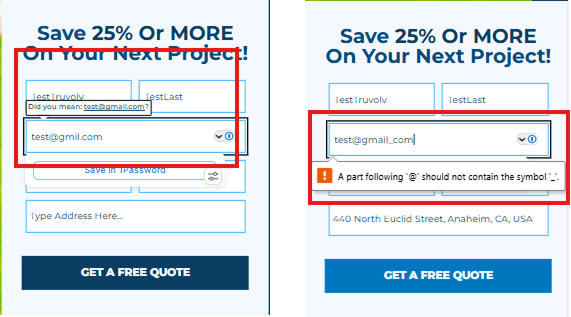
Smarter Email Fields
- What's New: Email form fields now run stronger validation, confirming the address is properly structured (username, @, domain, and TLD), that the domain uses only valid characters, and that the TLD is on the allowed list. Fields also catch over 200 of the most common domain typos (like @gnail.com instead of @gmail.com) and offer visitors a one-click fix to correct them on the spot. This applies automatically to every email field after a rebuild.
- Impact for Members: Fewer fake or mistyped addresses slip through, which means more real, usable contact info landing in your inbox. Cleaner lead capture means less time chasing dead-end contacts and more legitimate leads to follow up on.
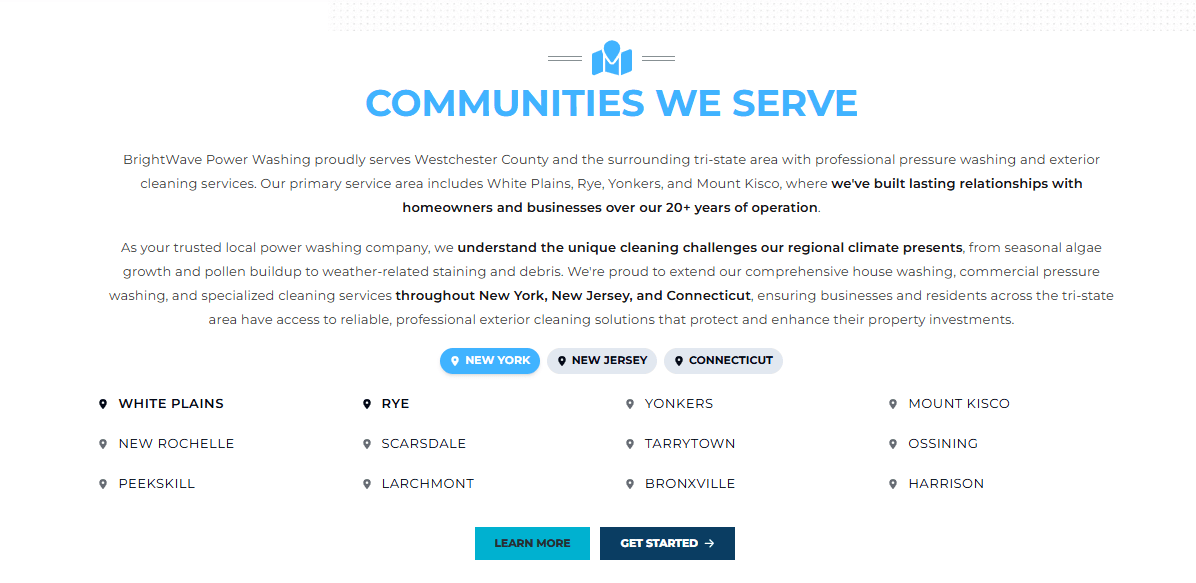
New "Service Areas Listing" Block
- What's New: A dedicated block for displaying service areas, replacing the long bulleted content blocks members used to rely on. Areas can be listed as text or links, organized by state with tab selectors or displayed all at once.
- Impact for Members: This gives members a clean, purpose-built way to showcase every service area without a messy, oversized list.
- See it Live - >HERE
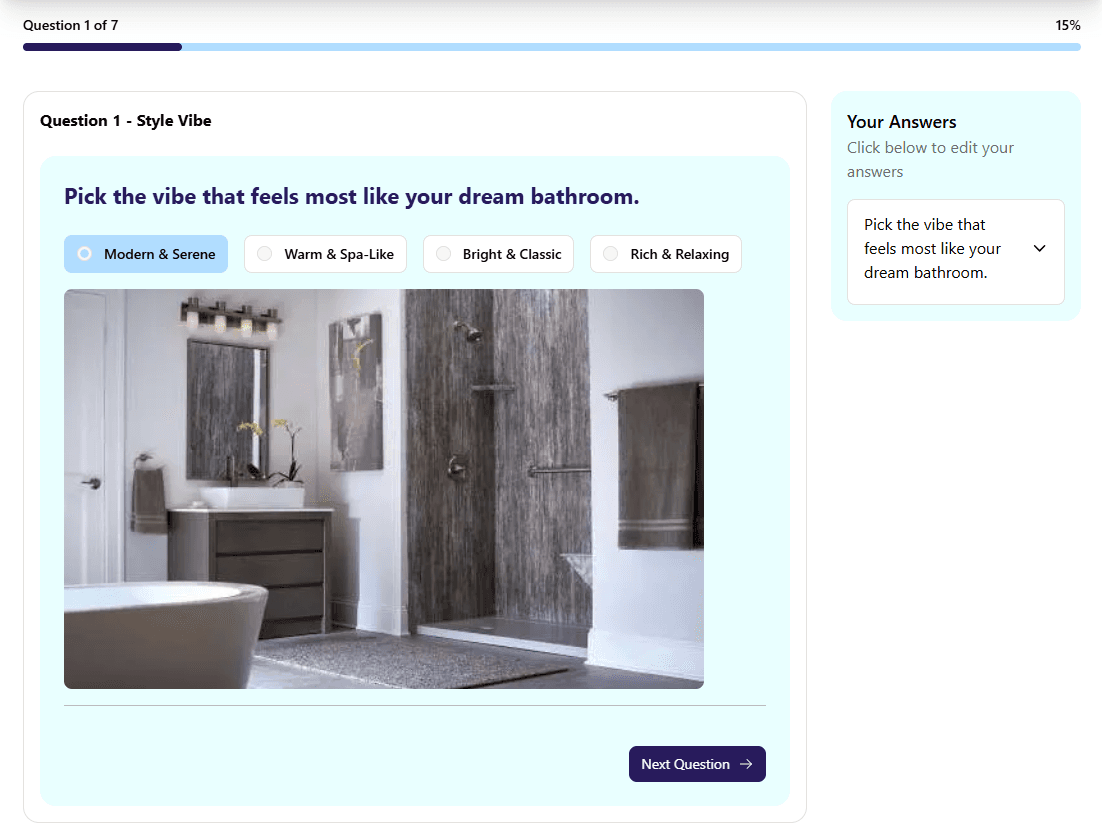
Adding Media Uploads to Questions (TruQuote)
- What's New: TruQuote now supports media uploads, with a new Media collection for managing and uploading images, just like in TruSpeed. Media can now be added to Select and Multiple Choice questions when multi-select is not toggled. Simply navigate to the question and upload an image in the new input field.
- Impact for Members: This makes calculators more visual and intuitive for the end user, letting members pair answer options with images to guide selection. It is especially useful for options that are easier to recognize visually than to describe in text.
- See it Live - >HERE
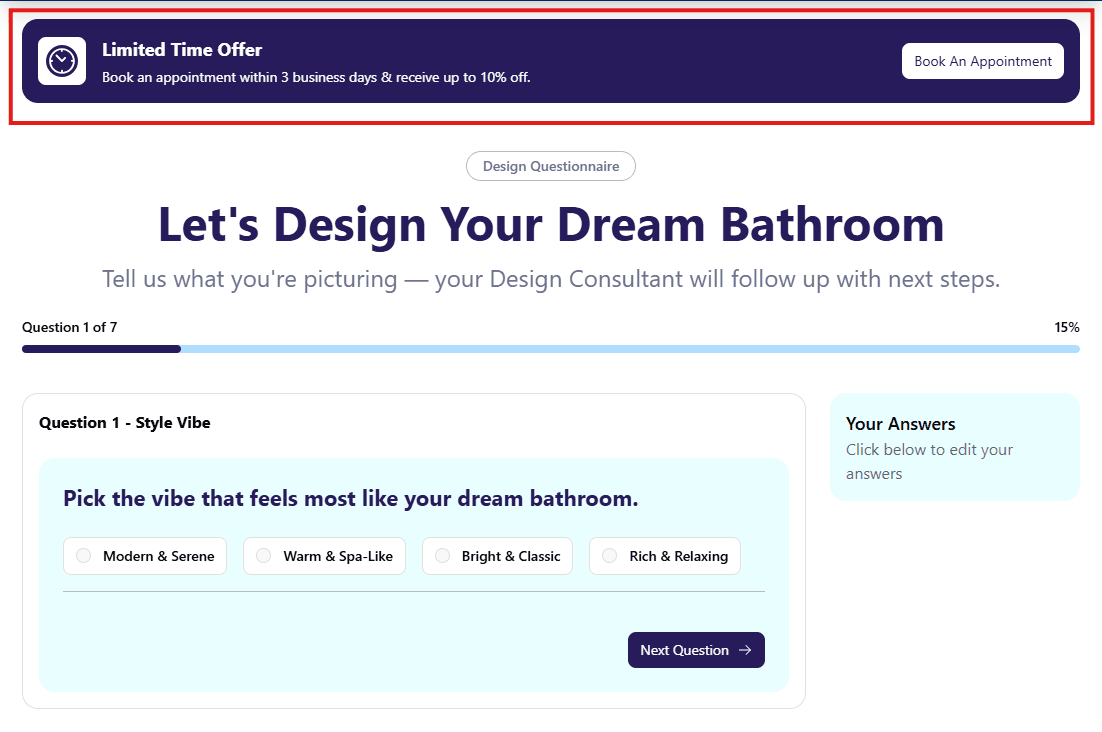
Offer Banners Across Calculator Steps (TruQuote)
What's New: Offer banners are no longer limited to the Estimate screen. A new Banners collection lets members add a banner to the Question Steps, Lead Form, and/or Estimate screen, so banners can appear anywhere across the calculator and differ between major sections (note that all question steps share the same banner).
- Impact for Members: This gives members flexibility to show a banner across more of the calculator, not just the Estimate screen: for promotions, trust signals like licensing or guarantees, or a nudge to finish the form.
- See it Live - >HERE
Quick Wins
Small-but-mighty upgrades that bring extra shine, smoother experiences, and more design flexibility.
- Below Block Spacing Expansion: Following Part 1, the Spacing Below field has now rolled out across 80% of blocks, remaining blocks to come soon.
- Full Width Hero Text Shadow: Hero text shadow is now supported on all heading sizes for the Full Width Hero. In most cases an image overlay is still the best way to keep hero text readable, but for the occasional member who doesn't want an overlay on their image, text shadow is now an alternative way to keep text legible. Support for additional hero types is planned for the future.
- Additional Phone Field Validation: Phone fields now follow standard numbering rules and reject invalid entries, such as numbers with a 0 or 1 immediately after the area code. This applies across all phone field blocks with no configuration needed after a rebuild, and helps cut down on spammy leads.
Form Integration Updates
Less flashy, still important. These behind-the-scenes updates allow us to integrate with new members and improve data attribution.
- Acculynx v2 Integration: We now support Acculynx's new API under the Acculynx v2 form integration. v2 is for members who need custom field mapping (like sending lead source to a dedicated field) and adds separate Contact and Job endpoints for a broader set of fields. It is not a required upgrade , so members whose needs are met on v1 should stay there.
- i360 Lighting Auth API Integration: i360 recently updated their authentication, which affected how our existing i360 integration works. This new integration resolves those issues, so members using i360 should move to it for reliable lead delivery. It sets up like any other form integration, and credentials can be pulled from the existing i360 integration.
- Job Nimbus Reverse Name Option: When creating a Job after Contact in Job Nimbus, members can now send names in Last Name, First Name order by toggling on the new Reverse Name checkbox in the form integration.
- Lead Perfection Phone Formatting Fix: The Lead Perfection and Google Sheets integration now strips non-digit characters from phone numbers before sending, resolving an edge case where extra parentheses were breaking the phone number formatting.
- Integration Dropdown Guardrails: The Meta, Marlimar, and Hatch integration fields now filter their dropdowns to only show integrations that fit that field, preventing setup mismatches (like accidentally placing a Lead Perfection integration in the Hatch slot) that would silently fail on site.